Showing posts with label vtu project. Show all posts

Monday, 28 March 2016

Olympic Logo

Olympic Logo


ABSTRACT

This project is about the creation of Olympics logo. We are implementing it using different primitives available in OpenGL library and combining them together in a required manner.
It highlights the key features of the data structures and its high quality efficiency that is obtained on its usage in the application program. This project consists of Olympic logo which is constructed by using different primitives available in OpenGL library. It illustrates the role of different call back functions that provides easier way to accomplish our project in an effective manner.
The project has been implemented by efficiently using the data structures to obtain the optimized results and also various functions and features that are made available by the OpenGL software package have been utilized effectively.

2.1 Aim

To display the Olympic logo in a fanciful way.

2.2 Olympic logo overview

The Olympic symbols are icons, flags and symbols used by the International Olympic Committee to promote the Olympic Games. Some—such as the flame, fanfare, and theme—are more common during Olympic competition, but others, such as the flag, can be seen throughout the year.
The symbol/logo of the Olympic Games is composed of five interlocking rings, coloured blue, yellow, black, green, and red on a white field. This was originally designed in 1912 by Baron Pierre de Coubertin, the founder of the modern Olympic Games. These five rings represent the five continents of the world- Asia, Africa, America, Australia, and Europe. Furthermore, each colour ring represents one continent like black ring represents Africa and so on.

2.3 Project Description: The Mini Project

Locomotive Olympic logo demonstrates the use of various OpenGL functions and its applications to model the requirements of an application programmer. It also illustrates the use of mathematical functions to control the execution of the project that is presented.
It highlights the key features of the data structures and its high quality efficiency that is obtained on its usage in the application program. This project consists of Olympic logo which is constructed by using different primitives available in OpenGL library and combining them together in a required manner. It illustrates the role of different call back functions that provides easier way to accomplish our project in an effective manner.

2.4 Scope

This project would be helpful in websites which hosts information related to Olympics; in a manner to give a creative home page for that website. Or it can also be used as a part of the game which wants to display the Olympic symbol in a creative manner.

Screen Shots


Olympic symbol with menu that having the actions to play.


Olympic symbol in animation.


Download Program Source Code here
Download Full Project Report here

Animated Robot

Simple Animated Robot


Simple Animated Robot OpenGL mini projects for 6th sem

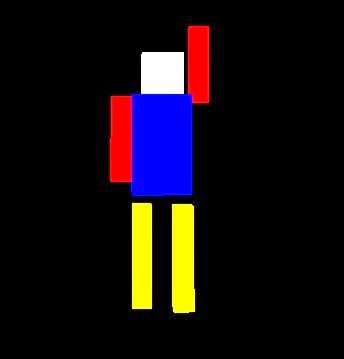
Computer graphics projects for 6th semester student of VTU is vital as it help them learn the graphics. Today we have a simple animated robot OpenGL mini projects for 6th sem. This computer graphics OpenGL projects is quite simple and easy to code as well as understand the implementation. Like the other OpenGL projects on this blog we have many things to learn from this.

  1. The robot is quite simple.
  2. The animation is auto, so as program execute robot start moving.
  3. Robot animate at same place and at same pace. No forwards or backward movement.
  4. There is no interaction (neither the mouse nor the keyboard). You have to add one if you like to submit this project.


There are few benefits as well

  1. It is easy to understand the codes as only primitive objects has been used.
  2. Every piece of code is commented.
  3. A simple but worthy project for student who don't want to waste much time on coding and getting the stuff harder.

Download Program Source Code here
Download Full Project Report here

Draw Fishes In OpenGL Computer Graphics

Draw Fishes In OpenGL Computer Graphics

In this so simple project  we are going to draw fishes. Yeah we are drawing fishes in OpenGL Computer graphics. It's not the project that shows the aquarium opengl project rather it draw the bitmap of fishes. The c/c++ program will helps in learning how to use the bitmap in OpenGL graphics.


Here we are going to draw many fishes namely - 20 instance of the bitmap fishes. This program is taken from LMU computer science Division, the CS department of Loyola Marymount University. All the Copyright is owned by them. This is Program is distributed for the purpose of education only.


Feature of the Program -
  • The program is used to show trivial use of OpenGL bitmaps
  • In this program we have the plotting of  about 20 bitmaps fishes in different colors.
  • The color of the fishes are random as well as the position on the screen.
  • No Keyboard and Mouse Interaction
What more can be added to this OpenGL Computer graphics Program are mentioned below - 

  • To make program more interesting, let all fish swim in a direction.
  • Make keyboard or mouse interaction to play and stop the flow of fishes.
Download Program Source Code here
Download Report here

Ludo Game

Ludo Game

The Project OpenGL Ludo game is an computer graphics project for VTU students. The computer graphics project used open source library – OpenGL with the c++.  This c++ project is based  on one of the oldest Board Game – the  Ludo. This OpenGL Ludo game is of two player game and not the regular four players.


OpenGL Ludo game rules


·         At the start of the OpenGL Ludo game, the player’s four pieces are placed in the start area of their colour.
·         Players take it in turn to throw a single die. A player must first throw a six to be able to move a piece from the starting area onto the starting square.
·         In each subsequent turn the player moves a piece forward 1 to 6 squares as indicated by the die.
·         When a player throws a 6 the player may bring a new piece onto the starting square, or may choose to move a piece already in play. Any throw of a six results in another turn.
·         If a player cannot make a valid move they must pass the die to the next player.
·         If a player’s piece lands on a square containing an opponent’s piece, the opponent’s piece is captured and returns to the starting area.
·         A piece may not land on a square that already contains a piece of the same colour (unless playing doubling rules).
·         Once a piece has completed a circuit of the board it moves up the home column of its own colour. The player must throw the exact number to advance to the home square.

·         The winner is the first player to get all four of their pieces onto the home square.

Procedure to Play in Ludo game C++ Project

·         A ludo board is normally a square marked with a cross. Each arm of the cross is divided into three columns, with the columns divided into usually six squares.
·         The centre of the cross is the finishing square which is often divided into four colored triangles. Eachcolored triangle is combined with a colored middle column appears as an arrow pointing to the finish.
·         The shaft of each arrow is a player’s “home column” and is five squares long. To the left of each home column, one square from the edge of the board is a starting square, also colored.
·         During game play a piece moves from its starting square, clockwise around the perimeter of the board, and up the player’s home column to the finishing square.
·          In the space to the left of each arm is a circle or square to hold a player’s pieces before they are allowed into play. There are no resting squares, but the colored home column may only be entered by its own player’s tokens.
·         The special areas on the board are typically brightly colored with yellow, green, red, and blue. Each player uses cardboard or plastic tokens of matching color.

Future scope of OpenGL Ludo game

·         Even though the Ludo game in C++ designed is enriched with many options, it is a two dimensional demo, in future this computer graphics project can be re designed with 3D animation and sound effects.
·         By using this demo further for four coins and four players can be implemented in this OpenGl Project.

Download Program Source Code here
Download Report here

Phases of Moon

Phases of Moon - VTU 6th Sem Mini Project

We have seen many OpenGL Projects for vtu 6th sem mini project, but this is quite as simple as of others. Today we are going to talk about the project related to moon. There are many phase of moon , it is define as - The lunar phase or phase of the moon is the shape of the illuminated portion of the Moon as seen by an observer, usually on Earth. 


Today for VTU 6th sem mini project in the computer graphics lab we are going to have the phases of moon. In the this program we showcase the camera orbits a lit moon to simulate the phases of the moon. This program used the OOP used in C++, the use of the classes and the methods.

First we create a class for the moon.  In the class moon we create an OpenGL display list, which is  created with create(), and the draw() method calls it.We have use the sphere to feature the moon, which has radius 1 centered at the origin. Another class which we have created is orbiter, this is an object that flies on a circle of a certain radius on the xz plane. The radius to it is supplied at the time construction. Since there is one one moon so it must be static, hence we declared the moon to be static variable. 

How we are showing the phase? It's easy by using the lightning property of OpenGL. We have used the GL_LIGHT0 to focus the light on the moon, making the all phase visible as it go. Pointing in the direction of vertex 1,1,1 it's is possible to show all the moon phases.

Future Addition to phase of moon vtu mini project

  • Add the name of the phases of moon as it's go.
  • Add interaction to the project.
  • In this, adding the zoom option is wonderful thought.

Download Program Source Code here
Download Report here

Tetris Game

Tetris Ggame Projects in Opengl Computer Graphics

There are many computer graphics games projects in the opengl. We have discussed many of them like ludo, snake xenia, mancala etc. Here are we have a new game projects in computer graphics. You may remember the childhood video game where we play the game of tetris. Here we are going ti implements the game of tetris in Opengl computer graphics.

The project is some what complex but not long. It has fewer lines of code. Logic is to have the function that define a random change of blocks or the shapes when key is press . With key press the angles are changes and hence the shape of the blocks are determines in each key press. The change is also selective and act on chosen shapes, means a shape of of long line may have four block in horizontal and vertices and no other shapes. The color is also randomly selected while for shapes changes it remain same. 


Keyboard Interaction -

  • Up arrow key - changes the shape in positive direction of angle
  • Down arrow key -  changes the shape in negative direction of angle
  • Right arrow key - move the blocks to right
  • Left arrow key - move the blocks to right
  • Esc - Closed the program

The important feature that this project lac is the disappearance of blocks as the line get filled. While timers and scores can be added in future to this projects along with sounds in the Opengl computer graphics.

Download Program Source Code here
Download Report here

Rocket Launching


 Rocket Launching

The rocket launching project is a 2D animation of a satellite launching process.
In our project rocket will be static prior to launching. When a launch is performed through interactions, the countdown begins for the launch. The countdown is 10 to 0, once the countdown is finished rocket is launched. Once the rocket is launched, actual animation starts here. Rocket starts moving into the sky, after sometime it reaches the space. The next phase of the rocket launch is dismantling stage1, in this stage the first fuel supplier will be dismantled. Now rocket starts moving with the help of second fuel supplier. The next stage will be dismantling stage2, here the fuel supplier 2 will be dismantled. The next phase is forced dismantling stage, where the unwanted parts are expelled. After this phase satellite is launched.

Screenshots:


Starting stage of rocket


 Snap shot showing intermediate stage and fume of rocket changing


Rocket entering in outer phase


 Rocket entering into the last phase


Download Program Source Code here
Download Full Project Report here